



MES × Equipment Data Integration
Excellent MES ×
FIELD system Basic Package Integration
Excellent MES (EXC-MES) integrates with FANUC FIELD system Basic Package to connect manufacturing equipment data with production management, enabling real-time visibility and effective use of shop-floor data.
Shop-Floor Challenges
Common Equipment Data Integration Challenges in Manufacturing
Manufacturing sites operate equipment from different brands and generations using various communication protocols. Data is scattered across machines and systems, making it difficult to establish a consistent data foundation for ongoing use.

Multiple Equipment Types and Protocols
CNCs, PLCs, inspection systems, and automation equipment use different data formats and communication methods, increasing connectivity and integration complexity.

Scattered Shop-Floor Data
Machine status, process parameters, quality, and energy data are distributed across different equipment, making centralized collection and management difficult.

Disconnected Equipment and Production Data
Equipment data is not linked with production orders, processes, quality, or equipment management information, limiting production traceability and subsequent analysis.
Solution Overview
FIELD system Basic Package Builds the Foundation for Shop-Floor Data Integration
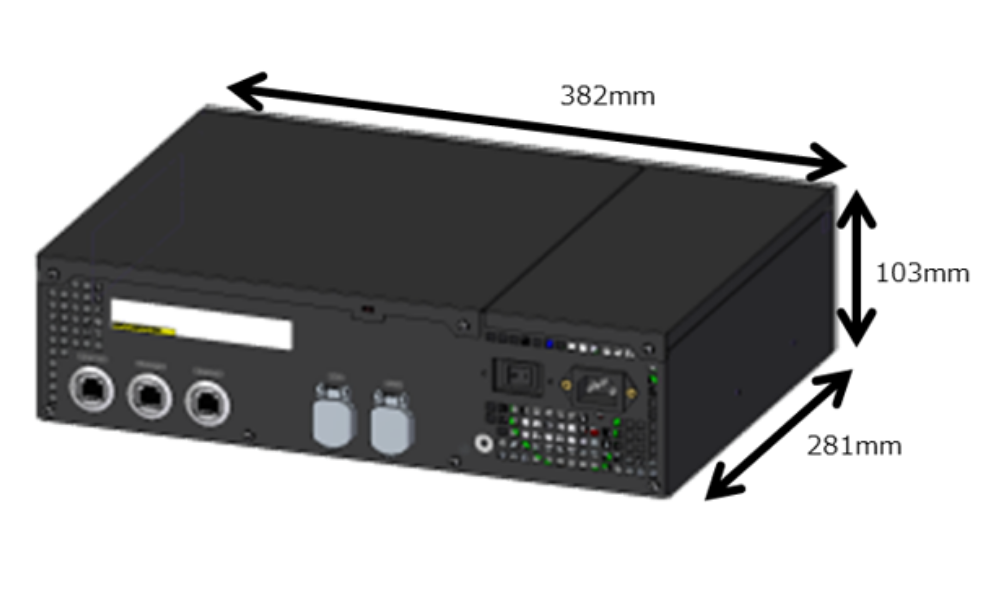
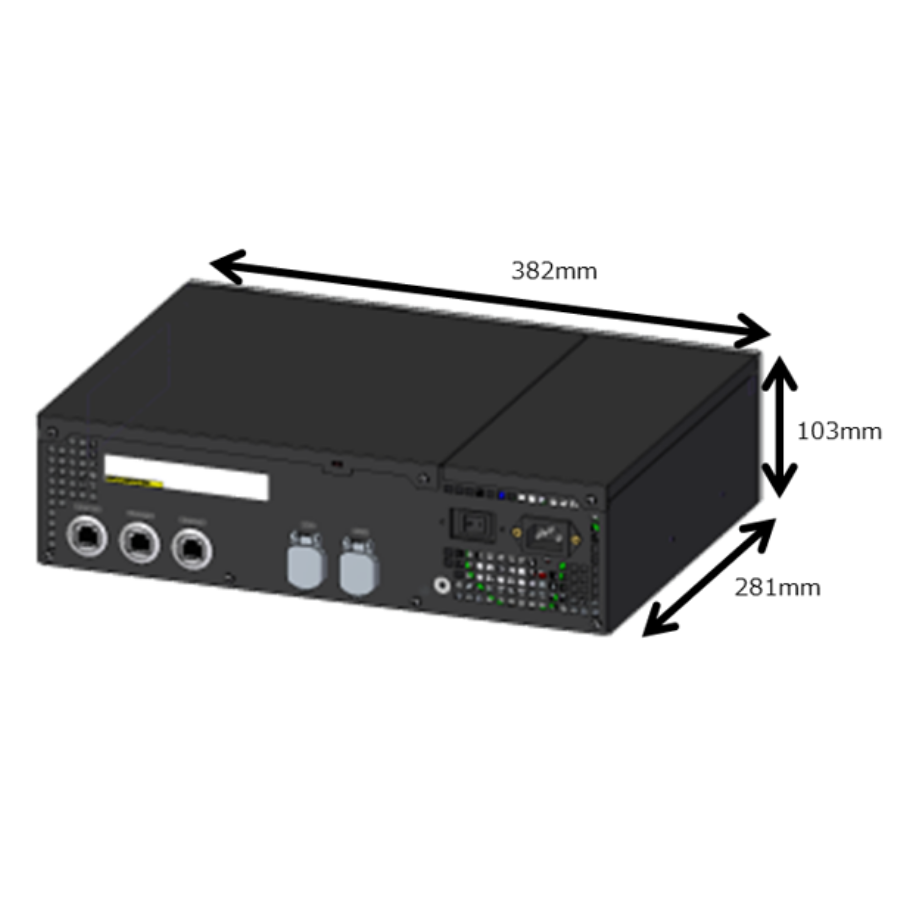
FIELD system Basic Package is deployed at manufacturing sites to connect different equipment, centrally collect equipment operating data, and send shop-floor data to EXC-MES and other upper-level systems, establishing a consistent data foundation for ongoing use.

On-Premises Deployment for Fast Implementation
The software is preinstalled on a dedicated appliance and can operate within the factory network, reducing initial setup and deployment complexity.
Support for Multiple Communication Protocols
Supports FOCAS, OPC UA, MTConnect, and Modbus/TCP, while enabling rapid connectivity with FANUC CNC equipment.
Centralized Collection of Shop-Floor Data
Collects equipment status, process parameters, alarms, and energy consumption data in one place, reducing data fragmentation.
Equipment Data Integration with MES and Upper-Level Systems
Standard interfaces transfer equipment data to EXC-MES, ERP, BI, and other internal systems, extending its use for management and analysis.
Integration Architecture
Layered Integration Architecture from Equipment Data to Production Management
FIELD system Basic Package connects manufacturing equipment and centrally collects equipment data. EXC-MES links this data with production orders, processes, quality, and equipment management, and then integrates with ERP, BI, and other upper-level systems to establish an end-to-end data flow.
04|Upper-Level Systems Layer

ERP

BI

Data Platform

ERP, BI, Data Platforms, and Other Enterprise Systems
Integrates production plans, master data, manufacturing information, and analytical data to support operations management and decision-making.
↕ Production Plans, Master Data, Manufacturing Information, and Analytical Data
03|Production Management Layer
EXC-MES
Production Order Management
Process Management
Quality Management
Equipment Management
Links equipment data with production orders, processes, quality, and equipment management to support real-time monitoring, traceability, exception handling, and maintenance.
↑ Equipment Data Transfer and Production Management Integration
02|Shop-Floor Data Integration Layer
FIELD system Basic Package
Equipment Connectivity
Data
Collection
Data Transmission
Connects shop-floor equipment through multiple protocols, collects equipment status, process parameters, alarms, and energy data, and sends the data to EXC-MES.
↑ Equipment Connectivity and Data Collection
01|Equipment Layer

CNC

PLC

Robotic Arm

Sensors

Inspection Equipment
Connects different types of manufacturing equipment, automation equipment, and shop-floor data sources.
Integrated Applications
Four Production Management Applications Powered by Equipment Data
FIELD system Basic Package continuously collects equipment status and process data. EXC-MES then links equipment data with production processes to support real-time monitoring, quality traceability, equipment maintenance, and process analysis.

Real-Time Production Monitoring
Real-Time Visibility into Production and Equipment Status
Centralizes equipment status, production progress, and exception information, helping shop-floor personnel monitor production conditions in real time.

Quality Traceability
Linking Process Parameters with Quality Records
Links equipment processing data with production orders, processes, and inspection results to establish complete production and quality records.

Equipment Maintenance
Equipment Exceptions and Maintenance Management
Records equipment status, alarms, and maintenance information to support maintenance planning and reduce the risk of unexpected downtime.

Process Analysis
Process and Production Performance Analysis
Combines processing time, equipment operation, and production results to provide a data foundation for process improvement and production-line performance analysis.
Solution Benefits
Equipment Data Integration Benefits
FIELD system Basic Package handles equipment connectivity and data collection, while EXC-MES links equipment data with production management processes, reducing manual consolidation and cross-system searches while supporting future system expansion.
01
Centralized Information
Faster Information Retrieval and Exception Identification
Centralizes equipment, production, and quality information, reducing the need to search across different systems and forms and helping shop-floor personnel identify issues more quickly.
02
Consistent Data
A Reliable Foundation for Manufacturing Data
Automatically collects shop-floor data and links it with production orders and processes, reducing manual input errors and improving data completeness and consistency.
03
Flexible Expansion
Phased Implementation and System Extension
Allows manufacturers to begin with shop-floor data collection and EXC-MES integration, then gradually connect ERP, BI, the Manufacturing Data Platform, and other enterprise systems according to operational needs.
Applicable Scenarios
For Manufacturing Sites Focused on Quality, Equipment Stability, and Data Management
From high-precision machining and equipment-intensive production lines to multi-line and energy-intensive operations, FIELD system Basic Package and EXC-MES connect equipment data with production processes.

Automotive and Precision Component Manufacturing
Quality Control and Production Traceability
Linking Processing Data with Inspection Results
Collects shop-floor data from machining centers and inspection equipment and links it with production orders, processes, and quality records in EXC-MES to quickly trace abnormal lots, processing conditions, and inspection results.

Management Value: Accelerates quality issue identification and traceability, reducing data search and rework time.

Electronics and Equipment-Intensive Manufacturing
Equipment Stability and Maintenance Management
Centralized Visibility into Equipment Status and Alarms
Continuously collects operating status, alarms, and production data from key equipment and integrates them with equipment and maintenance records in EXC-MES to support inspections and preventive maintenance.
Management Value: Reduces the impact of unexpected downtime and improves production-line stability.

Multi-Line and Energy-Intensive Manufacturing
Energy Data and Process Analysis
Integrating Equipment Energy Use with Production Performance
Collects equipment and production-line energy data and links it with production orders, processes, and results in EXC-MES to compare energy use across equipment, products, and production periods.
Management Value: Identifies abnormal consumption and improvement opportunities, supporting energy management and process optimization.
Implementation Process
Four Steps from Equipment Assessment to Go-Live
Based on shop-floor equipment conditions and production management requirements, the implementation proceeds through equipment connectivity, data validation, MES process integration, and production-line testing to ensure a smooth go-live.
Step 1
Shop-Floor Requirements and Equipment Assessment
Review equipment types, controllers, communication protocols, required data items, and production equipment management needs.
Step 2
Equipment Connectivity and Data Validation
Establish connections between FIELD system Basic Package and shop-floor equipment, then verify the accuracy and stability of data collection.
Step 3
EXC-MES Process Integration
Link equipment data with production orders, processes, quality, and equipment management workflows to establish integrated production management processes.
Step 4
Integration Testing and Go-Live
Conduct scenario-based testing on the actual production line, verify equipment data, system interfaces, and operational workflows, and then proceed with go-live.

Professional teams support validation at each stage to ensure clear implementation progress while addressing shop-floor operations and long-term maintenance requirements.
FAQ
Excellent MES × FIELD system Basic Package FAQs
Learn about the solution positioning, equipment connectivity requirements, implementation approach, and integration with upper-level systems.
Is FIELD system Basic Package an MES?
No. FIELD system Basic Package connects manufacturing equipment, collects shop-floor data, and transfers it to EXC-MES or other upper-level systems. EXC-MES manages production orders, processes, quality, and equipment management.
What equipment can FIELD system Basic Package connect to?
Connectivity depends on the equipment brand, model, controller, and communication protocol. Before implementation, the shop-floor equipment and data requirements are reviewed to determine the appropriate connection method.
Can existing equipment be included in the integration?
Yes. Existing equipment can first be assessed for connectivity. The controller, communication interface, and available data items must be confirmed before integration.
Must FIELD system Basic Package and EXC-MES be implemented at the same time?
Depending on equipment conditions and management needs, FIELD system Basic Package and EXC-MES can be implemented either in phases or together, covering equipment connectivity, data collection, and EXC-MES process integration.
Can it integrate with existing ERP, BI, or other upper-level systems?
Yes. Depending on actual requirements, production plans, master data, manufacturing results, and analytical data can be integrated with ERP, BI, the Manufacturing Data Platform, and other enterprise systems.
What information should be prepared before implementation?
Prepare an equipment list, equipment brands and models, controller and communication details, required data items, and current production, quality, and equipment management processes.
Plan Your Equipment Data Integration
From shop-floor equipment assessment and data collection to EXC-MES process integration, we help plan an implementation approach based on your equipment conditions and management requirements.